Free Online Punch Clock
Use this free online punch clock to punch in and punch out from your phone or computer. Clock in, clock out and your hours add up as you go, with no sign-up.
The time card needs JavaScript. Nothing you type ever leaves your device.
Related Time Clock Tools
How The Online Punch Clock Works
Press Clock in when you start work. The clock saves the exact time and starts counting. Press it again when you stop, and the shift is added to today on your time card.
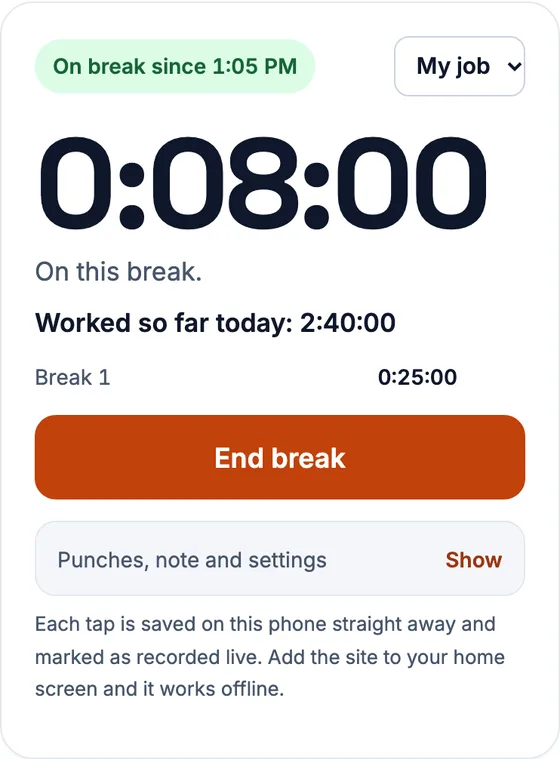
There is nothing to install and no account to make. Open the page on your phone or computer, press the button and get on with your day.
The clock keeps counting while the page is closed. It works from the time of each press, so you can lock your phone or close the tab and your hours stay right.
A Virtual Punch Clock For Any Device
This is a virtual punch clock that runs in your browser. You get a time punch clock online without buying a clock, a badge reader or a subscription.

It suits freelancers, shift workers, students and small teams who want a simple record of their own hours. Open it on a phone, a tablet or a computer and punch in. Think of it as a time clock calculator you can carry in your pocket.
Punch In And Punch Out Online
To punch in online, press Clock in. To punch out, press Clock out. Every punch is saved with the exact time and added to your time card for the day.
You can punch in and out as many times as you need in a day. Two shifts, a split day or a night shift all work, and the totals are added for you.
Clock In, Take A Lunch Break, Clock Out
Press Start break when you stop for lunch and End break when you return. The gap is left out of your hours. You do not need to work out the break length yourself.
Here is a day with a lunch break. The punches below give 7 h 40 m of work, which is 7.67 in decimal hours.
| Punch | Time | Counts as |
|---|---|---|
| Clock in | 8:52 am | |
| Start break | 12:05 pm | Morning: 3:13 |
| End break | 12:41 pm | Lunch: 0:36 unpaid |
| Clock out | 5:08 pm | Afternoon: 4:27 |
| Day total | 7:40 (7.67) |
The lunch break here is unpaid, so it is subtracted. If your break is paid, leave the break buttons alone and clock out at the end of the day.
A Time Clock Calculator As Well As A Clock
The punch clock does the sums as you go, so it also works as a time clock calculator. Each punch is saved with its time. The page adds the hours, takes off your breaks and shows the day and week totals.
If you only need to work out hours from times you already know, use the time card calculator and type them in.
Round Punches Or Keep Exact Times
Some employers round each punch to the nearest 5, 6 or 15 minutes. Others pay to the minute. The clock lets you pick either, and the setting applies to your punches from then on.
Rounding changes the total, so check which one your employer uses. If you are not sure, keep exact times. You can always compare them with your pay slip later.
Forgot To Clock In? Type The Time Instead
Everyone forgets sometimes. Open the time card and type the start and end times for the day, or edit a punch that is wrong.
Hours recorded live are marked as recorded live. Hours you type afterwards are marked as entered later. The mark stays on the card, so your record is honest about how each figure was made.
To fill in a whole week by hand, use the time card calculator.
What Happens To Your Punches
Your punches are saved in your own browser on this device. No account holds them, and nothing is sent to a server. Clearing your browser data removes them.
Each punch flows into the weekly time card. There you see daily totals and the weekly total. Add an hourly rate to see gross pay before tax.
Your punches do not follow you to another device. Make a backup file on one device and restore it on the other.
Use It On Your Phone
The page is built for a phone screen, and the punch buttons are large enough to press with a thumb.
After your first visit the page works without a connection, so you can punch in on a site with poor signal. You can also add it to your home screen to open it like an app.
If you work two shifts in a day, the time card with lunch breaks shows both clearly.
Is An Online Punch Clock Accurate Enough?
The clock uses the time on your own device. If your phone shows the right time, your punches are right to the minute.
This tool is made for tracking your own hours. It is not a replacement for the time system your employer runs for payroll. Use it as a personal record, and compare it with your pay slip.
- Check that your device clock is set to automatic.
- Punch in and out at the moment you start and stop.
- Use the break buttons for unpaid breaks.
- Review the week on your time card before payday.
Questions People Ask
Is this a time clock calculator?
Yes. It is a time clock that also calculates. It records each punch, subtracts breaks and totals the hours for the day, the week and the pay period.
Is there a clock in clock out calculator?
Yes. Press Clock in when you start and Clock out when you finish. The punch clock records each time and adds up your hours and any unpaid break.
What is a free online punch clock?
It is a time clock in your browser. You press a button to punch in and another to punch out, and your hours are added up for you. This one is free and needs no account.
What is a virtual punch clock?
A virtual punch clock does the job of a wall time clock on a screen. You punch in and out on your phone or computer instead of a machine.
How do I punch in and punch out online?
Open this page and press Clock in when you start. Press Clock out when you finish. Use the break buttons for lunch. Your hours appear on the time card.
Is this punch clock free?
Yes. It has no sign-up, no trial and no limit on how many days you track. The site is supported by ads.
Does it work offline?
Yes. After your first visit the page loads without a connection, and your punches are saved on the device.
Can I clock in on my phone?
Yes. The page works on any modern phone, and you can add it to your home screen.
What if I forget to clock out?
Open the time card and type the real finish time. The entry is marked as entered later, so the record stays clear.
Does it track lunch breaks?
Yes. Use Start break and End break. The gap is left out of your hours.
Where are my punches stored?
In your own browser on this device. We do not receive them, and they do not move to other devices unless you restore a backup.
Can my employer see my punches?
No. Nothing is shared unless you make a share link or a file and send it yourself.