Payroll Hours Calculator
This payroll time calculator turns your time card into hours worked in decimal form, with overtime, paid time off and gross pay.
The time card needs JavaScript. Nothing you type ever leaves your device.
Related Calculators
From A Time Card To Payroll Hours
Payroll systems usually want hours as a decimal, not as hours and minutes. A shift of 7 hours 45 minutes is entered as 7.75. Pay is then the decimal hours times the hourly rate.
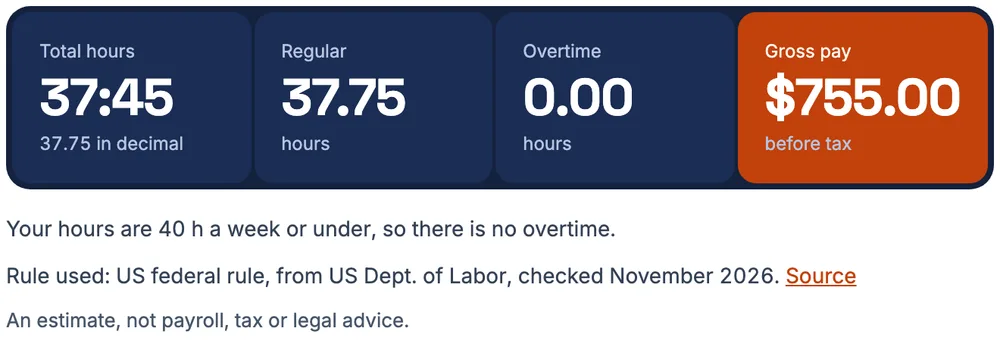
This calculator gives you both at once. Every day shows hours and minutes and the decimal, and the weekly total shows the decimal worked out from the total minutes. That is the figure to compare with a pay slip.
Enter your start and end times, your unpaid breaks and your rate. The totals panel splits the hours into regular, overtime and double time, and shows the gross pay before tax.
Why You Should Convert The Total, Not Each Day
Rounding each day first can move your total. Take five days of 7 h 50 m. As a decimal, one day is 7.83, and five days added together come to 39.15.
The true total is 39 h 10 m, which is 39.17 decimal hours. Rounding each day first loses 0.02 hours, which at $20.00 an hour is $0.40.
The calculator always works from total minutes and converts at the end. If your payroll rounds each day, you may see a small difference, and the working shows where it comes from.
| Method | Decimal hours | Pay at $20.00 an hour |
|---|---|---|
| Convert each day, then add | 39.15 | $783.00 |
| Add the minutes, then convert | 39.17 | $783.40 |
What Goes Into Gross Pay
Gross pay is what you earn before tax and deductions. It is built from a few pieces. Here is a week for a worker paid $22.00 an hour. The worker earns a $2.00 weekend premium, takes one paid time off day, and works Saturday and Sunday.
The worker is on the clock for 44 h. 4 h are overtime. The paid time off day is 8 h, paid but not worked.
| Part of pay | Hours | Amount |
|---|---|---|
| Hours worked at the base rate | 44:00 | $968.00 |
| Weekend premium | $16.00 | |
| Overtime premium (extra half) | 4:00 | $44.73 |
| Paid time off | 8:00 | $176.00 |
| Gross pay | $1,204.73 |
Overtime hours are first paid at the regular rate as part of the hours worked. The overtime line adds only the extra half.
The weekend premium raises the regular rate for the week to $22.36, so the overtime extra is based on that rate and not on $22.00.
Paid Time Off, Holidays And Sick Leave
Choose the type of day in the time card. Holiday, paid time off and sick days replace the start and end times with a number of paid hours.
Those hours are paid at your base rate, and they appear in the gross pay. They are not hours worked, so they do not count towards the overtime threshold. The time off total is shown under the weekly totals.
Checking A Paycheck Against Your Hours
A pay slip shows hours, a rate and the gross pay. The quickest check is to compare the slip's hours with the weekly total here, and then the pay with the gross pay line.
If the hours match but the pay does not, look at the overtime rate and any premiums. If the hours do not match, look for breaks that were taken off, rounding, or days that were left out.
Keep your own record as you go. The edit history on every day says when a time was typed in or changed. That helps if you need to show how you got a number.
To compare a pay slip line by line, use Was I paid right?
How To Use The Payroll Hours Calculator
- Type your hourly rate and choose your overtime rule in Settings.
- Fill in each day with start time, end time and unpaid break in minutes.
- Mark any holiday, paid time off or sick days, and enter the paid hours.
- Add a weekend or night premium if you earn one.
- Read the weekly totals, then download a PDF or CSV to send to payroll.
Estimates, Not Payroll
This is an estimate of gross pay, before tax. It does not know about tax withholding, benefits, tips, bonuses, pay slip adjustments or your employer's own rounding rules.
Use it to check your hours and understand your pay, not as a replacement for your employer's payroll.
Questions People Ask
How do I add up hours worked for payroll?
Add the hours and minutes for each day, then convert the total to decimal hours. The time card does this as you type, so the weekly total is ready for payroll.
What is a payroll time converter?
It turns hours and minutes into decimal hours, such as 7 hours 45 minutes into 7.75, so a rate can be multiplied by the hours. The decimal hours converter on this site does it for a single time.
How do I convert hours and minutes to decimal hours?
Divide the minutes by 60 and add the hours. 7 h 50 m is 7.83 decimal hours. Convert the weekly total in one go to avoid rounding drift.
How do I calculate gross pay from hours?
Multiply the hours worked by your rate, then add any overtime extra, premiums and paid time off. In the example week, that comes to $1,204.73.
Do paid time off hours count as hours worked?
No. In the example, 8 h of paid time off is added to pay, but the overtime is worked out only on the 44 h worked.
Why does my payroll hours total differ from this calculator?
The most common cause is rounding. If payroll converts each day to decimal first, the total can differ by a few hundredths of an hour. In the daily rounding example it is 0.02 hours.
Is the gross pay before or after tax?
Before tax. It is the total earned for the hours entered, with overtime and premiums, and no deductions.